
FOLOTOY

AI PASSPORT

YOUR NEXT IDEA STARTS HERE. BUILD IT WITH AI.

OPEN & SIMPLEANYONE CAN CREATE< WEAR · PLAY · CREATE >

HARDWARE / TRANSPARENT BY DESIGN

See what’s inside. Imagine what’s next.

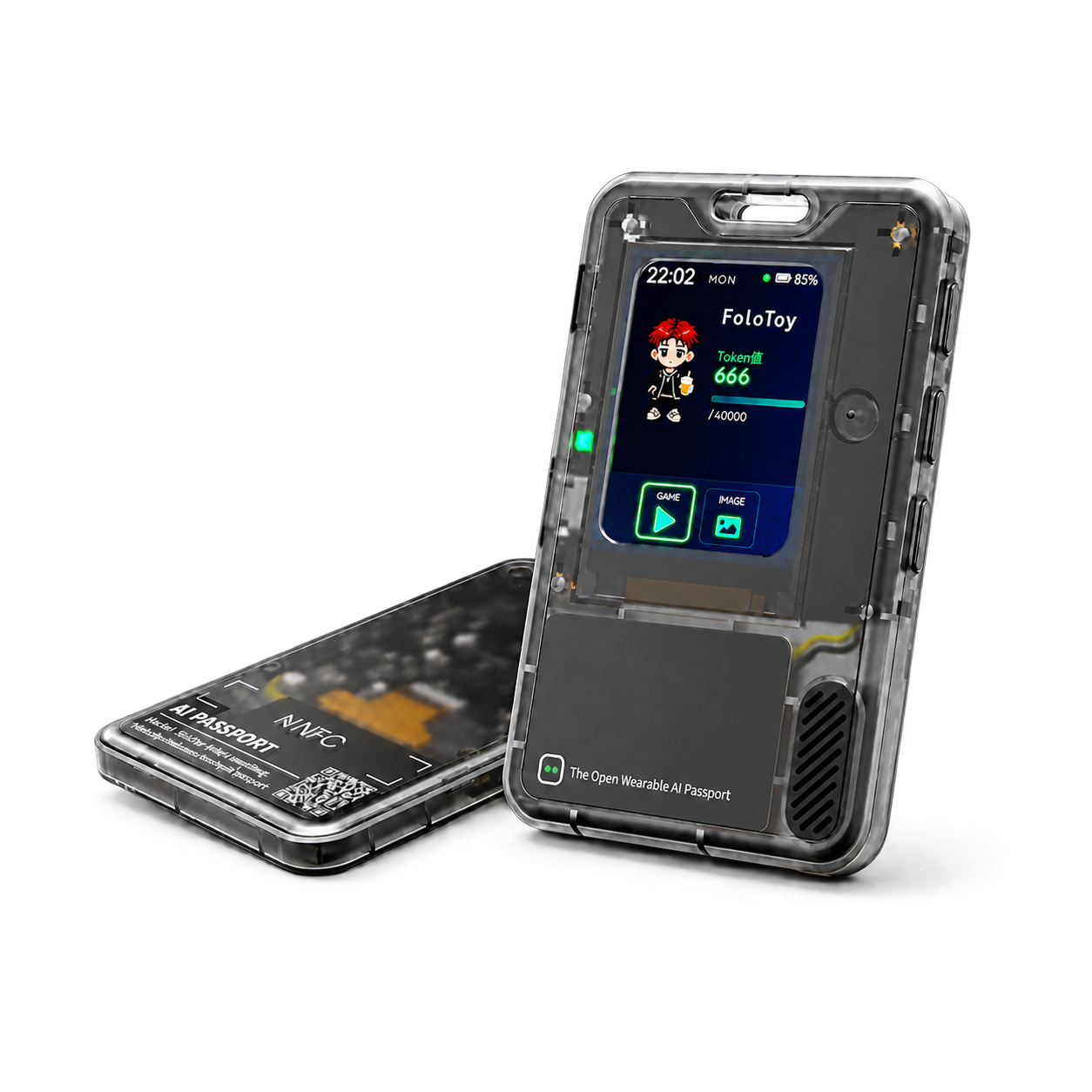
The clear case puts the hardware on display, from the screen and circuit board to the speaker and battery. With open firmware, you can put the buttons, NFC, microphone, and more to work in your own creations.

60×95×8.5MM / SIZE50G / WEIGHT500MAH / BATTERY
PRODUCT / SHOWCASE60 × 95 × 8.5 MM
AI Passport front and back product showcase

THREE WAYS TO USE AI PASSPORT

One AI Passport. Three ways to use it.

Wear it as a digital badge, try apps and games made by the community, or bring your own idea to life with AI.

01 / WEAR

Start with a badge that’s all you.

Turn it on and make it yours. Use the AI Passport WeChat Mini Program to send your name, profile photo, bio, or a full-screen image to your badge over Bluetooth. There’s a built-in game, too.

  • 01Ready-to-use digital badge
  • 02Profile and full-screen image
  • 03Built-in mini game
Learn more↗
Developer wearing AI Passport as a live identity badge
MAKE IT YOURSLIVE / NOT STATIC

APPS & GAMES / DISCOVER

Find your next favorite.

From multiplayer games to AI companions and everyday tools, find something you love and install it right from your browser.

CITY CONNECTIONS / 2026

Next stop. Let’s meet.

Bring your AI Passport. Meet people who love to make things.

Explore city events ↗
景德镇 / 10.19—11.01 · HERSTORY

Herstory 科技碰瓷节

FoloToy × HerStory
北京 / 10.23—24 · iRTE

iRTE 实时智能大会

FoloToy 城市宣传大使
上海 / 10.21—23 · PLAY!

CTE 中国玩具展

FoloToy

MAKE IT YOURS / CUSTOMIZE

Corporate gifts & bulk customization.

Corporate gifts & bulk customization

Customize the front-panel logo, startup screen, and apps. Logo customization starts at 100 units.

Explore customization ↗
OPEN TO POSSIBILITIES

GETTING STARTED

Get started. Then make it your own.

Set up your badge, try the built-in game, and explore community apps. Ready to build something? Our guides will help you get there.

01

Getting started with AI Passport

Use the WeChat Mini Program to sync your profile and a full-screen image, then learn the controls, built-in game, and charging.

→
02

Restore factory firmware

Scan the device QR code, copy its private link to your computer, and restore the default firmware with Chrome or Edge over USB-C.

→
03

Install a community app

Discover games, tools, and creative interactions shared by users in the App Library, and install a favorite; installing it overwrites everything currently on the device.

→
04

Create your own app

Follow the official docs to build and install your own game or interaction on AI Passport.

→
05

Create an app with an AI agent

Start with a clear idea, let an AI coding agent develop and build it, then install the app on a real AI Passport.

→
06

Build an AI Passport app with Codex

Open the app project in Codex, turn the idea into a verifiable task, then build, install, and iterate on hardware.

→
07

Build an AI Passport app with Claude Code

Let Claude Code understand the app project and hardware constraints, produce an installable build, and refine it from device feedback.

→
08

Build an AI Passport app with TRAE

Describe the app in TRAE Work, complete the code and build, then install the new experience on a wearable AI Passport.

→
09

Build an AI Passport app with Doubao

Open the app project in Doubao's Work mode on your own computer, let the agent build the firmware, and learn the limits of the free quota.

→
10

Build an AI Passport app with DeepSeek Harness

Install DeepSeek's open-source agent workspace, add the app project as a workspace, and go from one prompt to a finished build.

→
11

Build an AI Passport app with Qoder CN

Install Alibaba's Qoder CN desktop app and develop, build, and check your app in a local workspace.

→
12

Build an AI Passport app with WorkBuddy

Open the app project in Tencent WorkBuddy's Code development mode and let the agent build installable firmware.

→
13

Build an AI Passport app with ZCode

Open the app project in Zhipu's ZCode and let a GLM coding agent build installable firmware, confirming each command along the way.

→